Vidsieve Feed
YouTube without Shorts or distractions.
Filter recommendations, block channels, mute what distracts, and shape the interface. The rest of YouTube stays the same.
Chrome, Edge, Brave, Opera, Arc, Firefox
0hidden
Bread from scratch, start to finish
This trick changes everything
Intro to linear algebra, lecture 4
Behind the scenes: studio tour
How cities plan bus routes
Mix: lo-fi for studying
Wait for the ending
Fixing a 1970s synthesizer
Late-night jazz radio
10 gadgets you need right now
Fresh pasta without a machine
Linear algebra, lecture 5
What you can hide
No Shorts
Hide Shorts everywhere: home, subscriptions, search, sidebar. One switch and they're gone.
Hide what you've watched
Set your watched threshold and hide the video completely, or just dim it.
Block channels
One click from any video's menu, with undo if you slip. Put favorites on the whitelist and they pass every rule.
Less noise
Comments, related videos, end screens, sidebar shortcuts: hide what gets in the way.
Custom profiles
Swap your whole filter set at once. 3 ready-made profiles free; Pro to build your own.
Nothing leaves your browser
Everything runs in your browser. None of your data leaves it.
Even more control with Pro
Preview mode
See what a rule would hide before you turn it on.
Keywords
Filter titles by words or regex. Goodbye, spoilers and clickbait.
Automatic schedule
Switch profiles on their own by day and time: work hours, weekends, whatever fits.
Pro is optional: $9.99 once, and it also unlocks Pro in Vidsieve Loop.
How it looks in your browser
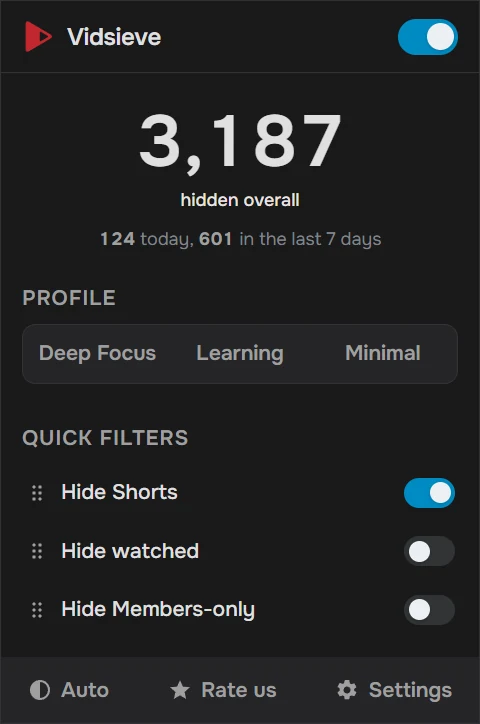
The popup shows how much has been hidden and keeps your favorite filters one click away.
How it works
- 1
Install the extension
One click in your browser's store. No sign-up to get started.
- 2
Pick your filters
Turn on what you want: hide Shorts, block channels, drop recommendations.
- 3
Done: your feed comes filtered
YouTube opens clean, your way, every time.
Questions
No. It filters the feed, not the video player. If you want an ad blocker, use one. They're different tools.
No. It runs on top of the page that's already there, with lightweight selectors. You won't notice a difference.
Vidsieve Feed works in Chrome and other Chromium-based browsers (Edge, Brave, Opera, Arc), and in Firefox. Vidsieve Loop works in Google Chrome.
No. Everything happens in your browser and no browsing data is sent to any server. The only network request is the Pro license check, and only if you activate Pro. See the privacy policy.